mirror of
https://github.com/hrfee/jfa-go.git
synced 2026-01-18 16:47:42 +01:00
 a4b94b4f45
switched to a fork of a fork of getlantern/systray which has no
ayatana-appindicator dependency.
156 lines
8.0 KiB
Markdown
156 lines
8.0 KiB
Markdown

|
|
[](https://ci.hrfee.dev/repos/3)
|
|
[](https://hub.docker.com/r/hrfee/jfa-go)
|
|
[](https://weblate.jfa-go.com/engage/jfa-go/)
|
|
[](https://wiki.jfa-go.com)
|
|
[](https://discord.com/invite/MrtvuQmyhP)
|
|
|
|
##### Downloads:
|
|
##### [docker](#docker) | [debian/ubuntu](#debian) | [arch (aur)](#aur) | [other platforms](#other-platforms)
|
|
|
|
---
|
|
## Project Status: Active-ish
|
|
Studies mean I can't work on this project a lot outside of breaks, however I hope i'll be able to fit in general support and things like bug fixes into my time. New features and such will likely come in short bursts throughout the year (if they do at all).
|
|
|
|
#### Does/Will it still work?
|
|
jfa-go currently works on Jellyfin 10.11.0, the latest version as of 21/10/25. I should be able to maintain compatibility in the future, unless any big changes occur.
|
|
|
|
#### Alternatives
|
|
If you want a bit more guarantee of support [Wizarr](https://github.com/Wizarrrr/wizarr) is popular and seems very polished. It supports multiple media servers, lots of customization and invitation through Discord.
|
|
|
|
---
|
|
|
|
jfa-go is a user management app for [Jellyfin](https://github.com/jellyfin/jellyfin) (and [Emby](https://emby.media/) as 2nd class) that provides invite-based account creation as well as other features that make ones instance much easier to manage.
|
|
|
|
#### Features
|
|
* **Invites**: Send invite links to new users so they can sign up without relying on you.
|
|
* Customize with profiles: Apply Jellyfin settings (library access, transcoding, etc.) on sign-up, with different profiles for each user type.
|
|
* Limit invites by time or number of uses, enforce strong passwords, require a CAPTCHA, and more
|
|
* **Password Resets**: Let your users do it themselves. Works with the Jellyfin "Forgot Password" feature, or through the "My Account" page. [See the wiki for your options](https://wiki.jfa-go.com/docs/pwr/).
|
|
* **Contact your users**: Collect email address, Discord/Telegram/Matrix info when the user signs up or add later, and jfa-go will contact them when needed (e.g. on/before account expiry, disabling/enabling, deletion) or when you wish with Markdown announcements.
|
|
* "Confirm email" optional, similar is required for Discord/Telegram/Matrix
|
|
* **"My Account"**: Lets your users change their password or email/contact info themselves and show them relevant info on a special page. Also,
|
|
* Referrals: Allow users a special, limited invite to give to their friends/family.
|
|
* **Advanced user management**: See all of your users at once and manage them in bulk (enable/disable/delete, send markdown announcements, apply profiles/settings, and more)
|
|
* User expiry: Set on an invite, and any new users will be valid for a fixed period (e.g. 30 days). After time passes, account is disabled, deleted, or disabled then deleted.
|
|
* **Ombi/Jellyseerr integration**: Sync username/passwords & contact details between your services.
|
|
* **Customizable**: Edit messages sent to users and shown on invites, "My Account" page and more with full Markdown support.
|
|
|
|
#### Interface
|
|
<p align="center">
|
|
<img src="images/invites.png" width="47%" style="margin-left: 1.5%;" align="top" alt="Invites tab"></img>
|
|
<img src="images/create.png" width="47%" style="margin-right: 1.5%;" align="top" alt="Accounts creation"></img>
|
|
<img src="images/myaccount.png" width="47%" style="margin-left: 1.5%; margin-top: 1rem;" align="top" alt="My Account Page"></img>
|
|
<img src="images/accounts.png" width="47%" style="margin-right: 1.5%; margin-top: 1rem;" align="top" alt="Accounts tab"></img>
|
|
</p>
|
|
|
|
#### Install
|
|
|
|
**Note**: `TrayIcon` builds include a tray icon to start/stop/restart, and an option to automatically start when you log-in to your computer.
|
|
|
|
`MatrixE2EE` builds (and Linux `TrayIcon` builds) include support for end-to-end encryption for the Matrix bot, but require the `libolm(-dev)` dependency. `.deb/.rpm/.apk` packages list this dependency, and docker images include it.
|
|
|
|
##### [Docker](https://hub.docker.com/r/hrfee/jfa-go)
|
|
```sh
|
|
docker create \
|
|
--name "jfa-go" \ # Whatever you want to name it
|
|
-p 8056:8056 \
|
|
# -p 8057:8057 if using tls
|
|
-v /path/to/.config/jfa-go:/data \ # Path to wherever you want to store the config file and other data
|
|
-v /path/to/jellyfin:/jf \ # Only needed for password resets through Jellyfin, ignore if not using or using Emby
|
|
-v /etc/localtime:/etc/localtime:ro \ # Makes sure time is correct
|
|
hrfee/jfa-go # hrfee/jfa-go:unstable for latest build from git
|
|
```
|
|
|
|
##### [Debian/Ubuntu](https://apt.hrfee.dev)
|
|
```sh
|
|
sudo apt-get update && sudo apt-get install curl apt-transport-https gnupg
|
|
curl https://apt.hrfee.dev/hrfee.pubkey.gpg | gpg --dearmor | sudo tee /etc/apt/trusted.gpg.d/apt.hrfee.dev.gpg
|
|
|
|
# For stable releases
|
|
echo "deb https://apt.hrfee.dev trusty main" | sudo tee /etc/apt/sources.list.d/hrfee.list
|
|
# ------
|
|
# For unstable releases
|
|
echo "deb https://apt.hrfee.dev trusty-unstable main" | sudo tee /etc/apt/sources.list.d/hrfee.list
|
|
# ------
|
|
|
|
sudo apt-get update
|
|
|
|
# For servers
|
|
sudo apt-get install jfa-go
|
|
# ------
|
|
# For desktops/servers with GUI (may pull in lots of dependencies)
|
|
sudo apt-get install jfa-go-tray
|
|
# ------
|
|
```
|
|
|
|
##### Arch
|
|
Available on the AUR as:
|
|
* [jfa-go](https://aur.archlinux.org/packages/jfa-go/) (stable)
|
|
* [jfa-go-bin](https://aur.archlinux.org/packages/jfa-go) (pre-compiled, stable)
|
|
* [jfa-go-git](https://aur.archlinux.org/packages/jfa-go-git/) (nightly)
|
|
|
|
##### Other platforms
|
|
Download precompiled binaries from:
|
|
* [The releases section](https://github.com/hrfee/jfa-go/releases) (stable)
|
|
* [dl.jfa-go.com](https://dl.jfa-go.com) (nightly)
|
|
|
|
unzip the `jfa-go`/`jfa-go.exe` executable to somewhere useful.
|
|
* For \*nix/macOS users, `chmod +x jfa-go` then place it somewhere in your PATH like `/usr/bin`.
|
|
|
|
Run the executable to start.
|
|
|
|
|
|
#### Build from source
|
|
If you're using docker, a Dockerfile is provided that builds from source.
|
|
|
|
Otherwise, full build instructions can be found [here](https://wiki.jfa-go.com/docs/build/).
|
|
|
|
#### Usage
|
|
Simply run `jfa-go` to start the application. A setup wizard will start on `localhost:8056` (or your own specified address). Upon completion, refresh the page.
|
|
|
|
```
|
|
Usage of jfa-go:
|
|
start
|
|
start jfa-go as a daemon and run in the background.
|
|
stop
|
|
stop a daemonized instance of jfa-go.
|
|
systemd
|
|
generate a systemd .service file.
|
|
|
|
-config, -c string
|
|
alternate path to config file. (default "/home/hrfee/.config/jfa-go/config.ini")
|
|
-data, -d string
|
|
alternate path to data directory. (default "/home/hrfee/.config/jfa-go")
|
|
-debug
|
|
Enables debug logging.
|
|
-help, -h
|
|
prints this message.
|
|
-host string
|
|
alternate address to host web ui on.
|
|
-port, -p int
|
|
alternate port to host web ui on.
|
|
-pprof
|
|
Exposes pprof profiler on /debug/pprof.
|
|
-restore string
|
|
path to database backup to restore.
|
|
-swagger
|
|
Enable swagger at /swagger/index.html
|
|
```
|
|
|
|
#### Systemd
|
|
jfa-go does not run as a daemon by default. Run `jfa-go systemd` to create a systemd `.service` file in your current directory, which you can copy into `~/.config/systemd/user` or somewhere else.
|
|
|
|
|
|
#### Contributing
|
|
See [the wiki page](https://wiki.jfa-go.com/docs/dev/).
|
|
##### Translation
|
|
[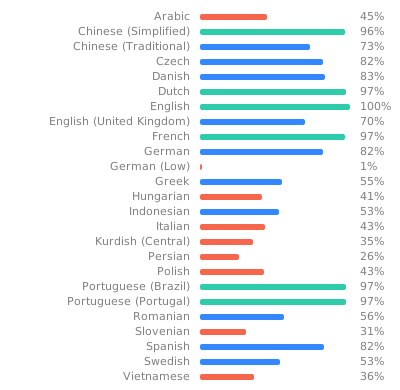](https://weblate.jfa-go.com/engage/jfa-go/)
|
|
|
|
For translations, use the weblate instance [here](https://weblate.jfa-go.com/engage/jfa-go/). You can login with github.
|
|
|
|
#### Sponsors
|
|
Big thanks to those who sponsor me. You can see them below:
|
|
|
|
[<img src="https://sponsors-endpoint.hrfee.pw/sponsor/avatar/0" width="35">](https://sponsors-endpoint.hrfee.pw/sponsor/profile/0)
|